Sunday, April 24, 2011

Shared blogging with Live Writer

It all started as a long awaited get-together in Savannah, Georgia, Tom and I have been friends since our college days but don’t get to visit very often, as we live on opposite ends of the country. We had a great time seeing and photographing the sights. When we compared some of our pictures, our different ways of seeing and capturing the world became strikingly apparent. We decided on a joint blog to share some of our photos side-by-side so others could enjoy the diverse approaches possible in photography.

With three time zones and over 2500 miles between us, working on a joint post is a challenge. Windows Live Writer to the rescue!image

We use WordPress, but it works just the same with Blogger or other blogging services. One of us starts a post in Live Writer, then uploads it as a draft.

The draft can be easily accessed by the other partner. The process is just a few clicks: Click the “blue tab”, as the pointer is moved down to “Open recent post” the list of published posts is displayed. But instead of clicking on a post, clicking on Open imagerecent posts brings up a new dialog.

The “Open” dialog shows the folders of drafts and recent posts. It also lists the blog accounts that are installed.image

Clicking on the blog name causes Live Writer to connect to the blog site and to download the titles of the posts – or the pages if you are using WordPress.

Clicking on the post title selects it and then OK starts Live Writer to download the post. This way you always have the most current material. A really nice Live Writer feature.

Now I can see exactly what my partner has proposed in text, pictures, and layout. I can just add my additions, or change what is already there. I can upload it again as a draft. Once we are agreed on the post it is just a matter of publishing in the normal way by clicking Publish.

“Shared blogging” using Live Writer in a slightly unusual way is easy, quick, and fun to do.

image

Click on the image above to see the blog “Two Cameras – Two Views”.


The gateway to my blogs and galleries is Café Ludwig

.:.

© 2011 Ludwig Keck

Saturday, April 9, 2011

My Photo Gallery blogs - a progress report

My enthusiasm about using a blog to build a photo gallery continues. The ease of putting a page together with links to enhance the viewers experience and arranging the layout in a pleasing way is just immensely satisfying and enjoyable.

My galleries are still very much under construction. There are some misplaced images – not everything works on the sites exactly as it looked in Windows Live Writer. There are also differences in the way browsers present the sites.

Still, perfection is a but a journey, so here some previews:

Click the images here to go to the sites.

image

imageimage

Your comments and suggestions are most welcome.

The gateway to my blogs and galleries is Café Ludwig

.:.

Saturday, March 26, 2011

Spring - Albums and Slide Shows

It is springtime once again. We all enjoy sharing the delightful images from gardens, parks, and just around town. Here are some of mine:

LJK_2482-1024

LJK_2575-1280


The photos link to albums and slide shows. In part to illustrate different ways of sharing photos and also to introduce a couple new sites for displaying my images.

You will have a chance to try Silverlight to present a slide show from my SkyDrive – and to view it another way if your browser can’t handle it.

I welcome your comments and feedback.

Enjoy!

Please also visit my blog on computer tips: This ‘n That


.

.:.

Tuesday, March 15, 2011

A Gallery NEWS Page

In another post (“The best sharing site? How about a combination”) I presented my views on building a gallery site just the way I like by using a blog as the basis. Also mentioned was the idea of using blog posts to announce the latest additions. Here is an illustration of that idea as seen in the new Internet Explorer 9:

GalleryLudwig-NEWS

This is a really neat way to present the newest photos and other “gallery news”. My “news” page is prepared using Windows Live Writer, as are the other pages of the “gallery”. That is an easy and flexible way to prepare the material. The few glitches, like varying ways that browsers interpret the photo locations, are easily taken care of. I am quite happy with the technique.

Here the link to the gallery: http://galleryludwig.wordpress.com/

And to the news page: http://galleryludwig.wordpress.com/news/

Enjoy!

.:.

.:.

Please also visit my blog on computer tips: This ‘n That

Monday, March 7, 2011

The best sharing site? How about a combination

There are many photo sharing sites, and each has some desirable features. For me none offered all that I wanted, that includes a personalized look and feel, access to slide shows, panoramas, and more. imageMy solution is a combination of several with the “entrance” based on a blog.

This allows using the “photo album” feature in Windows Live Writer to create the page layout I like and to link to my SkyDrive albums.

Another advantage of using a blog is the use of posts for the “latest additions” announcements. image

Linking to various photo sharing sites, Picasa Web Albums, Flickr, Shutterfly, and others makes the site fun to use and easy to maintain. Live Writer is my maintenance and update tool.

I can add to my SkyDrive, Flicker or Picasa Web Albums right from Windows Live Photo Gallery. With the links on my “gallery site” already in place, I need do nothing more. The photos will show up in the slide shows.

Other tools, particularly Microsoft Image Composite Editor, can be used to make panoramas or extra large images. These can be hosted on SkyDrive and displayed with “Zoom.it”. You will also find a 360 degree Photosynth image. All that is made possible by using a blog – no single photo sharing site can do all this.

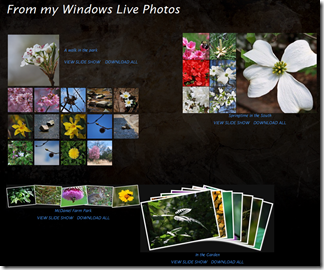
My “Gallery Ludwig” blog is a work in progress. I will be adding more pages and links and, of course, photos. Enjoy. The photos here link to two of the pages.

.:.

Please also visit my blog on computer tips: This ‘n That

.:.

Sunday, February 20, 2011

Distortion and Perspective – tilting buildings

Especially when using a wide-angle lens, or wide-angle setting, photographing tall buildings, trees, or other structures, causes the resulting photos to show the structures “falling in on themselves”. What causes that distortion, can it be avoided, and can it be fixed?
BuckheadThe situation is illustrated here in an exaggerated manner to show the problem. This is not distortion, although we may commonly call it “perspective distortion”. This is really how the world – optics, physics, and geometry – really work. When we look at the scene we seem not to see this distortion. Our brains take care of what comes through our eyes, instantly process the view, and present us with an “internal model of the world”. We know the buildings are vertical, and that is what we think we see.
BuckheadHere is a view looking up at a building. Again there is much perspective distortion, but in this view it does not seem to bother us. When we look up, this is what we see also, and we accept this perspective as natural.
Why the difference? In the wide-angle view we think we are farther away then was actually the case. The camera covered a wider field of view than we would see. From an actual distance where we could take in that view with our eyes, we would not see the same perspective. So the image does not jive with our normal experience. Can that problem be avoided or corrected?
Yes, the perspective distortion can be avoided: Do not tilt the camera upwards. It is as simple as that. When the camera is horizontal, more specifically when the sensor plane is parallel with the vertical surfaces, the resulting photo will show all the vertical lines indeed parallel and vertical. That comes from the optics and geometry, but let’s not get into the science.
But, you say, I can’t get all of the building into the picture, and besides, that gets a lot of uninteresting foreground into the photo. So my first suggestion is rotate the camera to take vertical pictures. Now you can’t get in all that you want to show. So take several pictures. Here are a series of photos that were taken with the camera pretty much horizontal and rotated for vertical pictures.
BuckheadBuckheadBuckheadBuckheadBuckhead
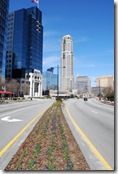
Note that I took a series of photos that overlap the scene. The reason is so LJK_1964-8-PGpan-raw-400that I can let Windows Live Photo Gallery combine the photos into a panorama. Here it is. Now I have a wide-angle photo of this streetscape in Buckhead, Atlanta, Georgia, that looks pretty good. With some cropping and less of the monotonous foreground I get a nice photo.
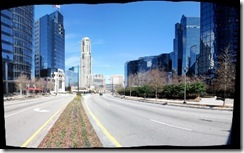
LJK_1964-8-PGpan-cropped-600
Can Photo Gallery do such a nice stitching job with photos if I tilt the camera up a bit as I take the shots so that more of the buildings shows?
You may have seen claims that you can do that (see my post “Distortion and Perspective”). Unfortunately when you ask Photo Gallery to stich such a set it works out differently.
Here again is a set of five shots, this time with the camera tilted up to eliminate the foreground pavement.
BuckheadBuckheadBuckheadBuckheadBuckhead
LJK_1979-84-PGpan-400Now hand them to the Panorama tool in Photo Gallery. Does it correct the perspective distortion? Take a look. The simple Panorama tool in Windows Live Photo Gallery does a fine job when you hold the camera to shoot horizontally. With photos that were taken aiming up, or down, the resulting stich will be more like part of a circular fish-eye image.
But there is a solution even for this set of photos. Photo Gallery, under the Create > More Tools command offers Create Image Composite… – if you imagehave Microsoft Image Composite Editor imageinstalled. (It is a free download, you can get it here).
ICE, as I like to call it, is a very powerful and versatile stitching and perspective control program. It permits control over the projection of the resulting image – in this case I set it to Cylinder (Horizontal) because that matches the situation. The resulting image can be controlled in real time – you see exactly what you get as you drag the image with pointer. You can also crop the image right in ICE.
Here is a resulting picture from ICE with a horizontal view of over 100 degrees.
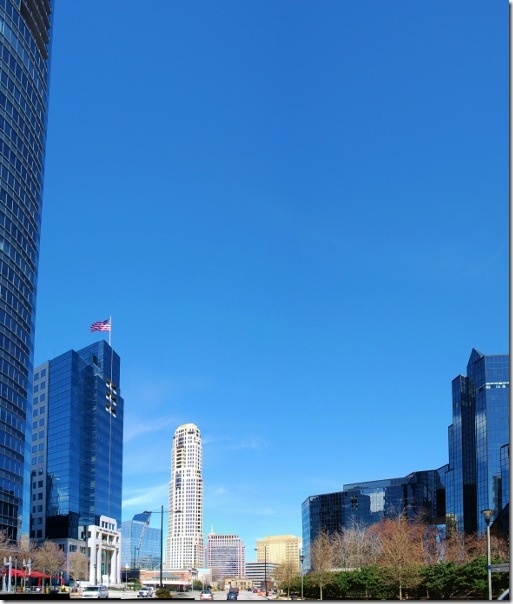
LJK_1979-84-ICE-crop-600
Notice that I have not completely eliminated the “tilting” – note the tall building at the left – it looks more natural this way.
So you see, perspective distortion is readily overcome. A bit of planning ahead and you can get the pictures you envision.
Good shooting to you!
For another post on perspective correction using ICE, see Perspective Correction using Image Composite Editor.


Please also visit my blog on computer tips: This ‘n That

Sunday, February 6, 2011

Distortion and Perspective

A while back a colleague posted:
Eliminate wide angle distortion with Panoramic photosHave you ever wished that you could capture a whole scene in one frame without having the trees/light poles/buildings slant towards the center?  You can!  
And then, unthinkingly, proceeded to confuse perspective and distortion as well as the readers.
In this post I would like to take up the first part: distortion.
Most of tzoom lenses on popular cameras present some barrel distortion on the low end of the focal length range. What is barrel distortion? Here is a photo taken with the lens covering about 76 degrees, the equivalent of a 28mm lens on a 35mm camera.
LJK_1894-600
LJK_1894-PSP-600This is the inside of the famous Grill in Athens, Georgia. There was no way to step back far enough so I used the shortest focal length setting – 18mm. Note the curved ceiling. This is distortion. Here an exaggerated version with more barrel distortion to illustrate the effect.
The lens barrel distortion is pretty well gone at longer focal length settings. So I took several overlapping exposures of the same wall and stitched them into a panorama with Windows Live Photo Gallery. To show the stitching I did no cropping:
LJK_1895-Grill-WLPGst-600
ICEWell the barrel distortion is well reduced but now there is obvious perspective distortion. Live Photo Gallery does not provide any controls for the stitching process, but Microsoft Image Composite Editor, “ICE”, does. ICE allows shifting the combined image to achieve perspective control. I will have more on this in another post. For now here is the resulting image, again without cropping from ICE:
LJK_1895-Grill-ICEst-600
So it is possible to reduce wide-angle lens barrel distortion by using tiled exposures obtained at focal length settings that do not show the distortion.
The slanting tress/light poles/buildings is, however, a perspective problem. More on that in another post.
Grill-ICE-2 (600x196)