Tuesday, August 28, 2012

The Weekly Photo (Week 35) Tiger at the Helm

Tiger at the Helm

We were walking through the mall when we came upon a children's play area. Sunlight was streaming through a skylight like a searchlight beam on one of the rides. The photo illustrates the limited range in brightness levels that can be accommodated in a photo. To us the mall was brightly illuminated with the tiger in the boat just being in sunlight. Tiger at the Helm

In the photo even the ceiling lights are just grey areas, while the tiger and the boat look bright.

The investigative types among my readers might be able to derive the time of day from the angle of the shadows. I will spare you the effort: the photo was taken about 3:30 in the afternoon. imageI left the geotag on the photo to demonstrate how the different services can make use of this.

Here is how it looks in SkyDrive (only my own, location is not shared), Picasa, and Bing Maps as reached from “Map it” in Photo Gallery.

image

image

image

.:.

© 2012 Ludwig Keck

LiveWriter-credit-360

Thursday, August 23, 2012

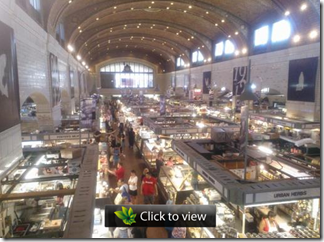
The Weekly Photo (Week 34) West Side Market

West Side Market

Celebrating 100 years of service, the West Side Market in Cleveland, Ohio is both a historic site and a delightful shopping experience. With just under 30,000 square feet (less than 2800 m²), this market is modest in size compared to today’s giant supermarkets, many of which are twice this size. It is different, however, in that some one hundred independent vendors offer a wide array of produce, meats, baked goods, and more.

West Side Market

I took a few shots with my Nokia Lumia 900 phone. photosynth-01There was another test in the back of my mind, but a colleague brought up combining photos, so I quickly loaded them into Photosynth. You can see the result by clicking the image here on the right.

With a little bit of looking around, you can see the location (just scroll down) and you can find other views of this amazing place.

imageIf you cannot shop there in person, you can visit the West Side Market site (click on name or the logo). Be sure to also see some of the historic photos on that site.

.:.

© 2012 Ludwig Keck

LiveWriter-credit-360

Sunday, August 12, 2012

The Weekly Photo (Week 32) Fall Flowers

Fall Flowers - Photo Gallery Auto Collage

Microsoft updated Photo Gallery – formerly known as Windows Live Photo Gallery. Besides the name change, the most notable new feature is “Auto Collage”.

Some four years ago Microsoft Research introduced  AutoCollage, an amazing and unusual collage builder. Face detection and automatic identification of interesting parts of photos, and smooth blending and arranging of the component pictures, made creating collages easy and fun. This technology has now been brought into Photo Gallery.

Sadly, the tool in Photo Gallery takes no instructions from the user at all. The results are pleasant enough, but there is no chance to tweak or adjust the resulting collage.  A minimum of seven pictures are required to make an “Auto Collage”.

I had a collage made in Picasa last Fall, so I used the same photos for an Auto Collage. Here, first the new Photo Gallery creation.

WP-1232-LJK_3540-Collage-3

For comparison here is my Picasa collage. Picasa offers full control over placement, orientation, frames, size, and background, however, the components have “hard” edges. The results are quite different. Enjoy.

WP-1232-Picasa-collage

.:.

© 2012 Ludwig Keck

LiveWriter-credit-360

Saturday, July 28, 2012

The Weekly Photo (Week 31) Café Curtains

My quest to master my smartphone camera continues. The Nokia Lumia 900 provides an amazing camera. Yet the differences from gear that I am used to are many. No viewfinder for one. Having to hold the camera at arms length makes aiming rather awkward for me. Without manual focus I have to rely on the little brain in the camera to decide what to focus on. I still can’t figure out what it sees, but I am making progress.

The camera can focus to about four inches, I have yet to prove that to myself. The shutter will happily operate at exposure times much to long to hand-hold successfully. That I have amply demonstrated.

Here is a photo, “snap” as my British friend would say, from today, taken under difficult light. The setting sun was just to the right of the edge of the photo. The camera did alright.

Café Curtains

The statistics

  • Aperture: f/2.2 – As with all cell phone cameras, all photos are taken at the full aperture.
  • The shutter speed was 1/720 second. Continuous variable shutter time sets the exposure.
  • The geographic location coordinates are about 80 feet from the actual location of the photo.

Most photo locations are right on, some are missed, like this one – maybe I did not allow the phone to acquire the GPS satellites. Not something I had to worry about with my “old-fashioned” photo gear.

The learning curve still looms steeply ahead.

.:.

© 2012 Ludwig Keck

Sunday, July 22, 2012

The Weekly Photo (Week 30) Artist at Work

We have a new gallery in the neighborhood and as part of their “get ready” efforts they conducted a painting workshop. Here is a young artist hard at work and admiring his success.

Young Artist at Work

Young Artist at Work

For my “artistical” interpretation, click the picture to see the post at Silver Gallery:

Young Artist at Work

.:.

© 2012 Ludwig Keck

LiveWriter-credit-360

Monday, July 16, 2012

The Weekly Photo (Week 29) Seeking Shelter

We were enjoying our coffee and chatting at the café, rain was coming down in streams, when I noticed two little birds. They had found shelter in the fender of the car parked right in front. I did not have my camera handy, so I pulled out my phone. With great caution I slowly moved towards the door. Of course the birds noticed my approach, one fled the shelter, the other was evaluating the situation. I quickly grabbed a shot through the glass door.

My snapshot isn’t much of a photograph, but it illustrates a couple of predicaments of digital photography with smartphones.

WP-1229-LK_20120712-1-1024

Smartphone tend to be wide angle lens cameras. Mine is the equivalent of a 28 mm lens on a 35 mm camera. Zoom is “digital”, meaning that the image is cropped in camera. This can be done more conveniently by cropping in “post-production”.

The smartphone camera, like all modern digital camera, is quite good at setting the exposure. As you can see in the photo above, the picture shows the dreariness of the day. The camera saw a lot of the gray, but bright, sky and the wet pavement, but may have made the scene just a little too dark. Digital cameras cannot compete with human vision when it comes to seeing bright and dark subjects without difficulties – one small area where our human brain is still ahead of technology. Then there is the limited range imposed by the JPG file format – 8 bits, just 256 levels from black to white.

With all these excuses, you might still wonder, what bird is he talking about? The little bird is sitting on the tire in the center of the photo. It is about 20 pixels high in an image that is 2448 pixels tall – less than one percent. It is so dark that you might not even find it knowing where it is.

WP-1229-LK_20120712-1-C-320So let’s crop the picture, and then tackle “too dark”. The “Fill Light” control in Picasa or the “Shadows” slider in Photo Gallery can bring up the darker parts of a picture very nicely. There is a price to be paid in “noise”, the dark areas will not be as smooth and clean looking. For a photo showing rain, this no problem at all.

While we have Picasa open there is one other item to take care of.

WP-1229-Picasa-04The default setting for smartphones is to include the geographic location information (GPS data) in photos. This is very useful, it makes it easy to go back and find out exactly where the picture was taken. When sharing with the whole wide world, as in a blog like this, some locations should be kept private – like a favorite fishing hole, or the bar that offers “bottomless” margaritas.

Picasa lets you remove the location data with just a few clicks. See the illustration here. Click on a photo (or select several), click the red pin (lower right) to open the “Places Panel”. Click the pin in the map. The little info tip offers a link to remove the location information.

Oh yeah, it does look the cars in my photo are the same cars as in the Google “Satellite” view.  Maybe it tells you something about loyal customers and a neat café. If you want to join us there, drop me a note.

.:.

© 2012 Ludwig Keck